Elgato Stream Deck +, Audio Mixer and Studio Controller with LCD Keys, Dials and Touch Strip Review (2026)
Updated September 21, 2026 · Research-based review
Our verdict
The Elgato Stream Deck Plus adds eight LCD keys, four dials, and a touch strip to a podcast or stream setup, making live control of audio and software fast and visual. It fits creators who already run their show from a computer, though it needs Elgato's software to function and costs more than a key-only deck.
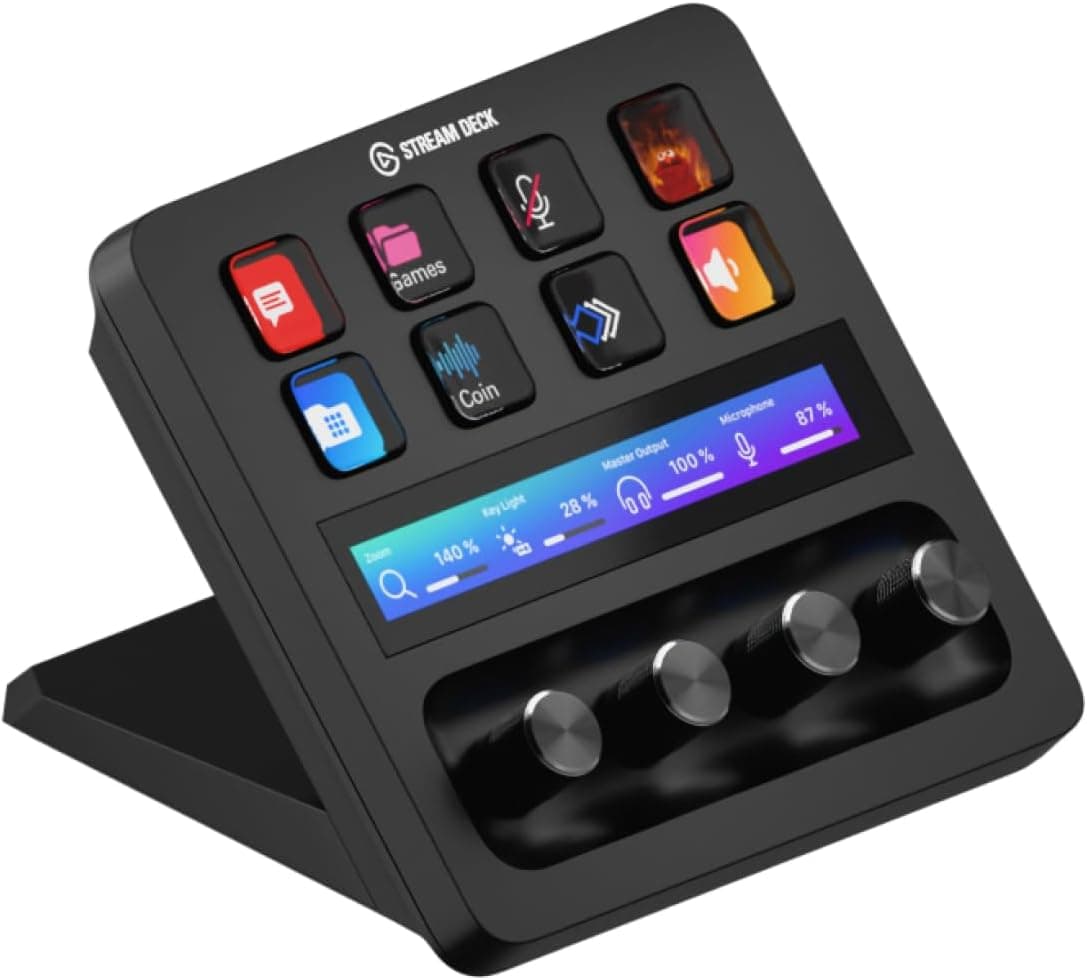
The Elgato Stream Deck + is a studio controller with LCD keys, dials and a touch strip, speeding up live stream and podcast control.
Price range: See on Amazon
What we liked
- + LCD keys show custom icons, so shortcuts are easy to find mid-show
- + Dials and touch strip handle volume and fine adjustments smoothly
- + Huge plugin ecosystem integrates with streaming and editing software
Trade-offs
- - Needs a computer running Elgato software to do anything useful
- - Pricier than basic key-only decks if you do not need the dials
What the Stream Deck Plus does
The Stream Deck Plus is a dedicated hardware controller with 8 customizable LCD keys, 4 dials with a push function, and an LCD touch strip, connected to a computer over USB-C. Each LCD key can show its own icon or label and be assigned to trigger an action, from switching microphone inputs to launching a soundboard clip or changing a scene in streaming software. The dials add rotary control for continuous adjustments like volume or EQ, while the touch strip can host sliders or additional shortcuts. Marketed as an audio mixer and studio controller, it is built specifically to sit next to a keyboard during live recording or streaming, putting the most-used controls for a show within easy reach.
Software and integration
None of the hardware does anything without Elgato's Stream Deck software running on a connected Mac or PC, since every key, dial, and touch strip action is configured and driven through that app. The upside of this dependency is a large plugin ecosystem: the software supports third-party and community-made plugins for streaming tools, audio mixers, video conferencing apps, and more, which is part of why the deck is popular with podcasters and streamers who run several programs at once during a live show. Profiles can be swapped so a different key layout appears depending on which show segment or software is active at that moment.
Build and physical footprint
The unit measures about 140 by 138 by 110 millimeters and weighs around 465 grams, a compact footprint meant to sit flat on a desk near a mic stand or keyboard. It connects with USB 2.0 Type-C, and a USB-C to USB-C cable is included in the box. The touch strip has its own small LCD panel for sliders and icons rather than physical buttons, which keeps the surface low profile. Being a desk unit with no built-in stand adjustment, placement is fixed to wherever it sits, unlike some XL or mini variants aimed at different desk layouts.
How it fits into a podcast setup
Compared with all-in-one podcast consoles like the RODECaster series, the Stream Deck Plus is not itself an audio mixer with XLR inputs; it is a software control surface that can trigger actions inside audio and streaming apps, including Elgato's own Wave Link mixer. That makes it a strong companion to a separate audio interface or mixer rather than a replacement for one. Against other Stream Deck models, the Plus sits above the basic key-only decks because of its dials and touch strip, which are aimed at people who want fine control over levels and settings mid-show, not just one-touch shortcuts, and who are willing to pay more for that extra control.
Who should buy it
This deck suits podcasters, streamers, and video creators who run their show from a computer and want fast, visual access to scene changes, soundboards, and mixer controls without hunting through menus. It is a good match for anyone already using Elgato's Wave Link or similar software mixers, since the dials can control levels directly. Buyers who only need a handful of one-touch shortcuts, without dials or a touch strip, may be better served by a cheaper key-only Stream Deck, since the Plus costs more for features they may not use.
Frequently asked questions
Does the Stream Deck Plus work without a computer?
No. It requires a Mac or PC running the Elgato Stream Deck software to configure and drive its keys, dials, and touch strip.
Can it control audio levels directly?
The four dials are designed for continuous adjustments like volume, and they can be mapped to control levels in software mixers such as Elgato's Wave Link.
What is different between the Stream Deck Plus and the standard Stream Deck?
The Plus adds four dials and an LCD touch strip on top of the customizable LCD keys, giving it more control options than key-only Stream Deck models.
How does it connect to a computer?
It connects over USB 2.0 Type-C, and a USB-C to USB-C cable is included with the unit.
Prices change often, so check the current price and availability on Amazon.
Check price on AmazonPodcast Gear Hub may earn a commission from the link above.