Rybozen 4K HDMI Video Capture Card 1080P 60FPS USB 3.0 Review (2026)
Updated September 20, 2026 · Research-based review
Our verdict
Rybozen's capture card takes a 4K HDMI signal and records it at 1080p 60fps over USB 3.0, a budget way to add a camera or console to a video podcast through OBS and similar software. Plug-and-play setup and HDMI loop-out keep it simple, though expect a lesser-known brand with limited support.
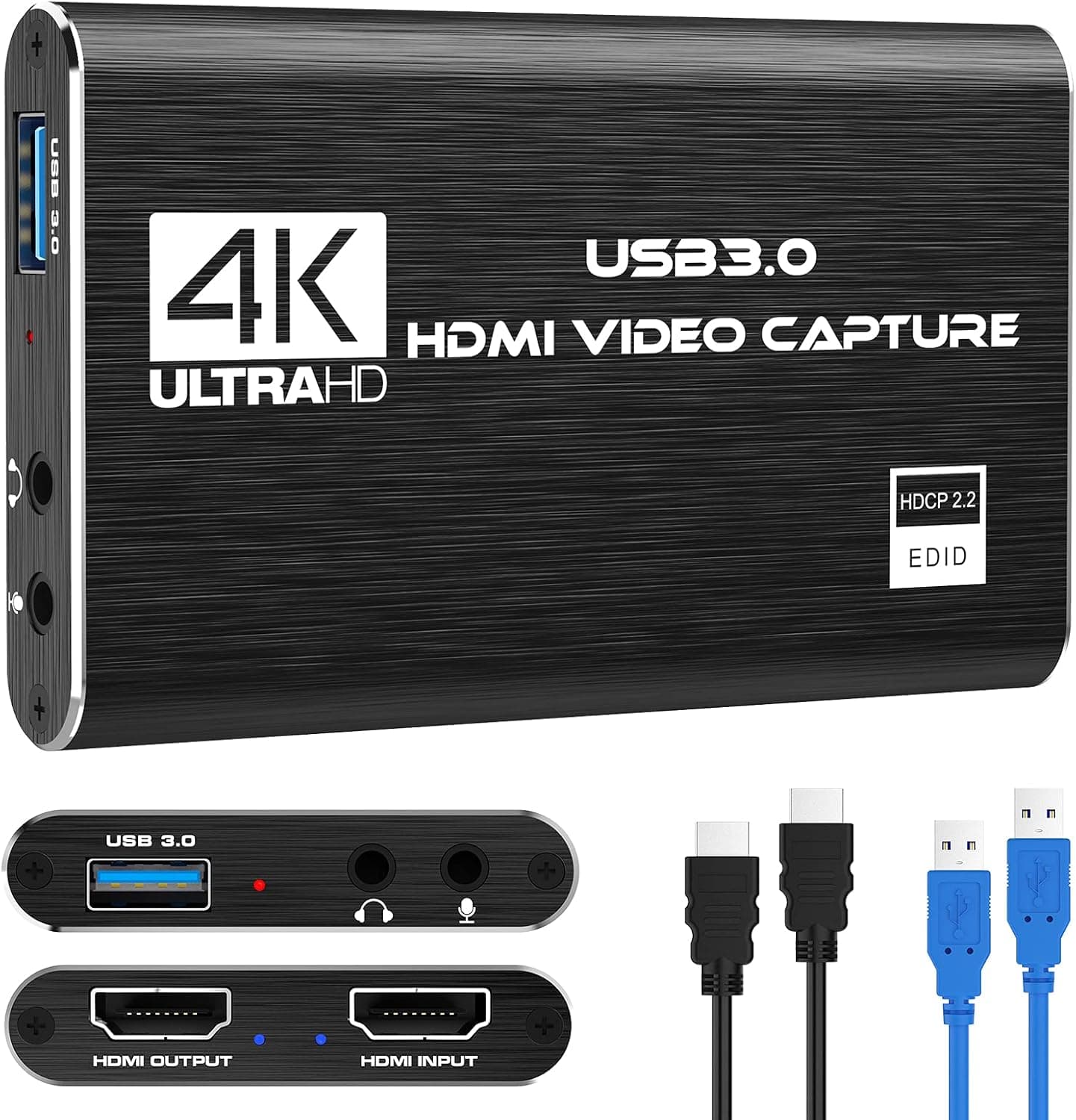
Rybozen's 4K HDMI video capture card with 1080P 60FPS over USB 3.0 is a budget capture option for streaming.
Price range: $ (Budget)
What we liked
- + USB 3.0 connection supports 1080P 60FPS capture
- + 4K input compatibility works with newer cameras and consoles
- + Affordable option for adding a camera to a video podcast
Trade-offs
- - Lesser-known brand with limited support resources
- - Can get warm during extended streaming sessions
Who this capture card suits
This capture card suits a podcaster or streamer on a budget who wants to bring an HDMI source, such as a mirrorless camera, game console, or a second camera angle, into their computer for recording or live streaming without spending on a higher-end capture device. It accepts a 4K HDMI input while recording out at 1080p 60fps over USB 3.0, which fits a workflow where the source camera shoots in a higher resolution but the final recorded or streamed output only needs to be 1080p. Anyone who specifically needs a 4K recorded output rather than a 4K passthrough should look elsewhere, since this device downsamples video to 1080p for capture.
HDMI loop-out and low latency
The card includes an HDMI loop-out port alongside its HDMI input, letting the original signal pass through to a monitor or TV at the same time it is being captured, so you or a guest can see the live feed without relying on the software preview window alone. Rybozen markets the device with low-latency technology aimed at keeping the delay between the source and the captured feed small enough for live use, which matters for monitoring a recording in real time or reacting to a live stream chat without a noticeable lag between action and display.
Plug and play compatibility
No drivers or external power are needed, since the card draws power from the USB 3.0 connection and is meant to be recognized automatically once plugged into a Windows or Mac computer, which keeps setup simple for anyone who is not comfortable installing driver software. It is built to work with common streaming and recording software including OBS, Potplayer, and VLC, and supports platforms like Twitch, YouTube, and Facebook for live streaming. On the source side, it is compatible with game consoles, DVD players, camcorders, DSLR and mirrorless cameras, and other HDMI-equipped devices, giving it broad use beyond just gaming capture.
Mic input and where it runs warm
A 3.5mm microphone input on the card lets you mix in commentary or narration alongside the captured video signal, useful for adding live commentary to gameplay or an interview segment without routing audio through a separate interface. As with many compact USB capture devices in this price range, the card can get warm during extended recording or streaming sessions, since a small plastic housing has limited room to dissipate heat compared with larger, actively cooled capture hardware. Keeping the card in open air rather than tucked behind other cables and away from other warm equipment during long sessions will help it run cooler and more reliably over a full recording session.
Value against other capture cards
Against other budget 4K-input, 1080p-output capture cards, the Rybozen card is priced competitively and covers the same core specs, HDMI loop-out, USB 3.0, and mic input, that similarly priced rivals offer. Its main disadvantage next to more established capture card brands is a smaller support and documentation footprint, since lesser-known brands typically offer less in the way of firmware updates or dedicated customer support if something goes wrong down the line. For someone adding a single extra camera or console feed to a video podcast on a tight budget, it delivers the core functionality needed without paying extra for a premium, well-known brand name.
Frequently asked questions
Does this capture card record in 4K?
No, it accepts a 4K HDMI input and passes it through the loop-out port, but recording and capture output are limited to 1080p 60fps over USB 3.0.
Does it need drivers to work?
No, it is plug-and-play and does not need drivers or external power, and should be automatically recognized once connected over USB 3.0 to a Windows or Mac computer.
What software does it work with?
It is compatible with common recording and streaming software including OBS, Potplayer, and VLC, and supports streaming to platforms like Twitch, YouTube, and Facebook.
Does the capture card get hot during use?
It can run warm during extended recording or streaming sessions, which is common for compact USB capture devices in this price range.
Prices change often, so check the current price and availability on Amazon.
Check price on AmazonPodcast Gear Hub may earn a commission from the link above.